Showing posts with label web services. Show all posts

Saturday, June 16, 2007

Say Goodbye to Snail Mail

Say goodbye to the old-fashioned snail mail. New web services make it possible to subsist on electronic mail alone. For most of us, the majority of our correspondence has been done electronically since Juno first offered free email. This does not however, stem the flow to the mailbox that clutters your desk and inbox and fills the garbage can.


Switch to Electronic Statements


Make a list and check it twice:

Nearly all business prefer to have you set up on electronic statements. Notable exceptions are government institutions and those with stock in the paper companies (I think?) Contact those that you do business with. Make a list of all your paper bills and as you change these to electronic statements, notate the date, time, confirmation numbers, etc. File this list for reference later. This does require some initial legwork on your part. Not all bills can be switched over by means of their websites. Some will require telephone calls.

Follow Up, Follow Up:
Next, you need to devise a way to make sure that those statements actually make it to you each month. “I didn’t receive the bill” is not a valid excuse and it is up to you to find out if and why a statement/bill is not making its way to your inbox. To help with the initial setup and make sure that you are receiving all your bills, I recommend that you set up a Google Calendar specifically to remind you to check for your latest statements a few days after the billing dates (find this on your statements or you can call customer service).

Opt out of Junk Mail

Do Your Paperwork:
Direct Mail - The Direct Mail Association offers a form to opt out of mail from members of their association. You can get the from online (www.the-dma.org/consumers/offmailinglist.html), but you still have to submit it through our favorite subsidized postal system. “Mail Preference Service at P.O. Box 643, Carmel, N.Y. 10512”

Credit Card Offers - Opt out of credit card offers through the credit reporting agencies at: www.optoutprescreen.com

Others - The Center for Democracy and Technology has a general form to mail to those that continue to send you mail after completing the above steps. Download the customizeable forms at:
www.opt-out.cdt.org

Or be Devious:
“One way to stop the offers is to sign up for so many cards and run up such high levels of debt that you become a credit untouchable. That is not a good plan.” NY Times Damon Darlin

You could also mail a box of rocks to the Republican/Democratic National Fundraising address with the “Postage Will Be Paid By Addressee” envelope and your return address taped on the front. This should guarantee that you never receive these envelopes again.

Cancel the Magazine Subscriptions

Rivaling TV (I don’t have one) and radio, magazines will probably subject you to more advertising than any other media outlet (if you use adblock plus). This is not only a waste of time, but can end up being a drain on the pocketbook. Print magazines normally have websites with rss feeds to grab their content without the paper version in your mailbox. Another option is to find another website or blog that covers the same information. You will normally have the news faster than the larger print magazines can deliver.

The Rest


Now that we have done what we can to reduce the amount of mail coming in, we all know that there will be some correspondence and junk mail that will always be sent with a stamp in the upper right corner. (Grandma’s birthday card, local mass mailers, your favorite magazines)

Here is where a relatively new web service steps in to help us out. Earth Class Mail (previously Remote Control Mail) offers to e-mail you scans of your postal service mail with options to open and email you a scan, shred, recycle, and forward to a different address. All this does come at a price. The lowest plan (Bronze) starts at $9.95/month when prepaid for 12 months all the way up to the Gold plan for $49.95 (paid monthly). No monthly plan includes the shipping for forwarding mail.

Outbound Postal Mail


That takes care of the inbound postal mail, but what about getting letters to your great uncle who doesn’t believe in computers? (Disregard this paragraph if you already bought a lifetime supply of "forever stamps.") Postful is still in beta, but it is easy to get an invite. This service will print a full color page and mail it from an email for $.99 each. No envelopes or stamps are required, just include the name and address in the subject line. This could take care of the majority your outbound snail mail needs.


Keep in mind that, depending on your correspondence practices and personal habits, the goal of this article may be both impractical and unnecessary, however, I hope someone will find it somewhat useful.

Thursday, May 3, 2007

USAA Deposit At Home

USAA has a relatively new service that allows their customers to deposit checks in their accounts without ever physically mailing the check to them. This new service allows you to scan checks at home and they are deposited in your account. Just void the checks after depositing them. The money shows up in your account for use that hour. I tried this service for the first time yesterday and had a little trouble in my Firefox browser. The customer service rep said that some of the extensions I was using were keeping the Java applet from working properly. Rather than disable my extensions and reactivate them one by one to find the culprit, I decided to do the deposit in IE. The whole process went smoothly and I don't plan to use deposit envelopes anymore. Check out the screen shots to follow.

The link for this service is on the right hand side of the page when viewing your account activity:
Here is the intro screen:


Next you select the account that you are depositing to and enter the amount of the check:


After you enter the amount of the deposit and continue, the Java Applet will pull up and allow you to press a button in the browser to scan the check.


Make sure that the check is properly oriented according to the scanning bed of your scanner. Once the check shows up, click on the lower right corner to crop the check. A red outline will appear around the check. Click "Next" and repeat the process to scan the back.


In the end, you should receive a confirmation screen that has an overview of the deposit information. I always print this screen to a PDF and archive it for my personal records.


I know that not everyone has access to a USAA account because of the restriction on membership, but I thought that some would be interested in how this works because USAA is the first to offer this service and more companies might follow. Let me know if you know of any similar services or if you bank with USAA let me know how this works for you.

Wednesday, May 2, 2007

Add To Google Calendar In One Line

For those GCal users among us, this nice little tech tip popped up from GoogleTutor. This quick little article notes how to include event name, date, time, and place all in one line to add the event without going to the details.

Quick Google Calendar Tip: Say It All In One Line!

Thursday, April 26, 2007

Find Someone To Do Your Chores

Trying to find someone to take care of those mundane tasks that are eating up your schedule. Enter your personal concierge: DoMyStuff.com. The site is just getting started and the ratio of tasks to assistants is miniscule, but it has spectacular possibilities. This site matches those people looking to have their tasks done and those looking to do the tasks(obviously for pay). The people looking for work, bid on the tasks that you put up. Tune your kid into this site and have him earn his spending money. D0MyStuff takes a cut of all money that passes through the site. See if you can make it useful.


DoMyStuff

Do An Online Price Check Away From Home

Frucall allready has an 800 number that offers similar features, but still uses airtime minutes. With their new texting service can get the same info by sending an SMS message with a product’s UPC or ISBN number.

While the service is still in beta, text messages must have the prefix: “FRU” and be sent to: "32075". Frucall says they will be offering a dedicated number and dropping the prefix once the service moves out of beta.

Frucall can also bookmark items and save your inquire history. You’ll have to register for a free account.

Frucall

How to Get Out of Your Cell Contract

Are you lusting after that new phone, but it is only available through another carrier, and you have another year left in your contract? Are you moving to an area where your provider has awful service, but you are stuck till the end of your contract? Apparently, you are not the only one in said situation. Celltrade.com is a service designed to match up people looking for shorter-term contracts and those looking to get out of their contracts. This provides a unique way to get around those exorbitant Early Termination Fees.


Celltrade

Tuesday, April 24, 2007

Edit Video Online

Makeuseof.com put together a great list of online video editing services. Don't feel like keeping a memory hogging app for video editing on your system? Check out these websites that can handle it all online. You would be surprised at what you can do.


18 Online Tools to Edit, Mix and Enhance your Videos

Retro Gaming Galore

Do you miss those old games that you used play on your Commodore 64? Do you long for that retro gaming experience? Check out cs64.com for quite a few of them as Java based online games.

c64s.com
from Freeware Genius

Sunday, April 22, 2007

Montastic Free Website Monitoring Service

Want to keep an eye on your website, without checking it over and over again? Monastic can check up to 100 websites every 10 minutes and notify you by e-mail, rss, or a yahoo widget if anything is amiss.
Montastic

Saturday, April 21, 2007

Soundpedia

SoundPedia is a streaming music jukebox that has quite a bit of music available. The interface is a bit clunky(selecting an artist name one letter at a time from a list of links?). You can select tracks from albums to add to your playlist. Overall, this service does a good job for a free service without the ads making me feel too claustraphobic.

Use Your Mobile Phone For (almost) Anything

Looking to get more out of your cell phone? Check out this list of useful mobile sites and services. Record calls, get news, share photos, get maps, search for real estate, get coupons, get traffic, and watch TV. ...Deep breath... You can even download this helpful list as an Excel spreadsheet.

Friday, April 20, 2007

Joost Beta TV on the Computer

I enjoy the concept of TV programming on the PC. I have never owned a TV and find that this could open the door to a lot of content. There are still a few issues that need work in the Joost Beta, but you can't beat the price(free). I recommend that you make every effort to get your hands on a beta invite and check it out.

Interface -
The interface was not very intuitive. Sure, I could have read instructions, but who wants to do that? I had a hard time figuring out how to move from screen, and even find the button to close the program.

Content - There are a variety of channels in the beta. You should be able to find something that you can watch to test the service without falling asleep.

Speed - Obviously, we are not talking about high resolution, but I was impressed with the speed that the programming started playing after the channel was selected. I have broadband cable internet.

Check it out for yourself and let me know what you think. Email me for an beta invite!

Tuesday, April 17, 2007

YouMail Personalized Voicemail


YouMail is one of my favorite free services on the internet. I can't believe how little publicity it receives. The personalized voicemail receives more comments/compliments than a cool website or e-mail signature combined. Granted, it does only work with Verizon, T-Mobile, and Cingular GSM, but here are a few reasons that I love this service:

Wow Factor - The impression it leaves when you call that person's name in their voicemail greeting is priceless. People would almost rather get your cool voicemail than actually speak with you.

Simplicity - It is extremely simple to set up with step-by-step instructions from the website. You can record greetings through your phone, with your computer mic, or upload audio files. (see screenshot below)

Accessibility - You can access your voice mail throught the old fashioned audio navigation on your phone or the iPhone style on their website. I also have all the voicemails e-mailed to me as attatched .wav files that I normally listen to at my desktop. This makes it a little easier to take notes.

Archiving - Want to save that e-mail with instructions from your client? Just archive the e-mail with the attatchment and pull it up later for reference.

Check it out for yourself and let me know what you think! Do you have any other creative ideas for how to use this service?

By Rob
YouMail.com

MyxerTones

Myxertones.com is a free service that allows even the simpleminded to make better use of their gadgetry. Simply upload an audio file (mp3 or wav) and Myxertones will send a midi to your phone free of charge. Make sure you check with your service provider about what the messages will cost, but for me (without a text messaging plan), they were only a few cents each.

Elementary instructions, tailored to individual phones, address how to take the audio files from the messages and set them as ringers. I used Audacity to clip some of my favorite tunes down to ringtone length before uploading and came up with some very creative personalized ringtones. Now you can set multiple distinct ringtones and differentiate your callers in the first seconds of the ring.
Myxertones

E-mail to Snail Mail - Postful Beta


After the Google Paper gag, I bet a lot of people were thinking, “That’s not such a bad idea”.
Well, it would be useful if you could send emails to mailing addresses like normal letters. Or even receive actual letters in your email? Postful does just that.


1. Send emails to mailing addresses through Postful- digital to physical.
2. Receive emails from physical letters via a personal Postful mailbox etc - physical to digital.

This takes care of a lot of instances where email is either insufficient or impractical. First of all, Gmail’s idea of physical backups can actually be done. Just forward what you want backed up to your home address. Postful can save specific emails to specific addresses.


Of course, it all costs:
$.99 for the 1st page

$.25 each additional page


Price includes:
Full-color printing
All production and materials
First-class postage (US only, international coming in June, 2007)
Previews for confirmation and proofing

I’ll have to wait till June to try it out. Meanwhile it is still in Private Beta, so you’ll have to shoot an email off to sign up. Anyone have any experiences with Postful?

Monday, April 16, 2007

101 Resources for Freelancers

By Cyan

From Freelance Switch


Update: Added 8 Resources suggested by the community… We are putting together a proper resource directory to launch tomorrow since this has proven so darn popular!


The web is such a big and wonderful place, packed with tools and resources which you all too often don’t know about. So to help all you freelancers out there we have compiled a gigantic list of resources, categorized up for your benefit. If you know a resource that we’ve missed, let us know as we’re always looking to grow this list!

Timing
These are tools to help you time and track your work. Some of them plug into invoicing programs and some even come with them built in:

  1. SlimTimer - A Start/Stop little timer that tracks jobs on a main web interface
  2. Tick - Timetracking application focused on keeping track of your budgets
  3. Time Assistant - Professional timesheet software
  4. Harvest - Simple and efficient time tracking
  5. FourteenDayz - Online time tracking for teams
  6. PunchyTime - A simple time tracking tool for creatives

Invoicing
When you don’t invoice, you don’t get paid, so it literally pays to stay on top of your billing. Here are some tools to help:

  1. Billing Orchard - Electronic billing and invoicing software, starting at $14.95 per month
  2. Billable - Service and invoice tracking
  3. SimplyBill - Easy to use invoicing software
  4. Blinksale - More easy to use invoicing software
  5. Quickbooks - Small business financial software
  6. Side Job Track - Free web-based job tracking, invoicing, reporting and project management for the part-time independent contractor
  7. Freshbooks - Tracks time, sends invoices by email or U.S. mail, and generally makes invoicing easier
  8. InvoicePlace - Easy Invoicing and Quotes From Anywhere
  9. LessAccounting - Is your job title Accounting? Probably not. Do less accounting!

Project Management and Organization
These resources will help you stay organised and manage those projects and clients

  1. Proposal Kit - Proposal and contract management tools
  2. Ta-Da Lists - a simple (free!) to-do list application that can be shared with the world
  3. Backpack - Service that integrates to-do lists, notes, files, images, and a calendar with reminders that can be sent to your email or cell
  4. Writeboard - Sharable, web-based text documents that save edits, so you can collaborate, roll back and compare
  5. ConceptShare - Share designs and get feedback with visual annotation tools
  6. Wridea - Free tool for writers focusing on idea generation
  7. GoPlan - Note-taking, calendaring, task management, issue tracking, file management and online real-time chat
  8. Toodledo - Another web based to-do list
  9. ActiveCollab - Open source collaboration and project management tool
  10. MonkeyOn - Your to-do list for things that you want other people to do
  11. Remember The Milk - Another To-Do List manager

Stock Libraries
Templates, Photos, Flash files all to help make you look good

  1. FlashDen - A resource selling stock Flash, audio, video and fonts for as little as 50 cents
  2. Dreamstime - Royalty free stock photography for $1 - $2
  3. Getty Images - When price is no object and quality is essential
  4. Istockphoto - Royalty free stock photography, videos, and illustrations for $1 - $50
  5. Veer - Rights managed and royalty free photography, illutration, type, and motion
  6. Stock.xchng - Completely Free stock photography
  7. Ice Templates - Website templates in Flash and HTML
  8. Template Monster - The biggest website template company on the web!
  9. MyFonts - All the fonts you could ever want and a very handy font identification tool as well.
  10. IconBuffet - Icons, more icons and even more icons

Business Tools
Resources to help with the business of freelancing…

  1. HighRise - Track communication and conversations with leads, employees, clients, colleagues, vendors
  2. Campfire - Real-time group chat and file sharing
  3. Central Desktop - Shared workspaces and web conferencing
  4. Relenta - Manage your email, contacts, documents and activities
  5. Google Apps - Communication and collaboration tools from Google
  6. Zoho - Free office tools
  7. Campaign Monitor - Email newsletter software
  8. Breeze - Email campaign and newsletter software
  9. Business-Paper - Easy business cards
  10. GoToMeeting - Easy online meetings
  11. Wufoo - Make forms to survey your clients
  12. AIGA Spec Letter - Sample letter to communicate with clients who want spec work or free pitching
  13. CPA Directory - Find an accountant (in the US)
  14. SBA - Small Business Administration, help and advice
  15. Paypal - Online payment system
  16. Moneybookers - Online payment system
  17. Escrow - Online payment system that protects the buyer and seller, useful for those bigger jobs with anonymous clients.
  18. Resources for the Design Entrepeneur - Free sample forms and agreements
  19. Work - How-to guides to running a small business
  20. XE - Quick and easy currency converter for all your international transactions…
  21. Trendwatching - Consumer trends and insights resource

Legal
Because you have to protect yourself and your work…

  1. My New Company - Legal and general start-up information
  2. Designers Toolbox - Free legal forms for graphic designers
  3. Copyright - Everything you need to know about US copyright
  4. AIGA Form of Agreement - Standard form of agreement for design services trmplate

Job Boards
A whole bunch of places to find jobs, and don’t forget FreelanceSwitch will be adding its very own job board real soon!

  1. 37signals Job Board - Mostly full-time design and programming jobs
  2. Authentic Jobs - Full time and freelance job board for standards aware designers and developers
  3. Coroflot Job Board - Designer job board
  4. WebProJobs - Freelance and full-time jobs for designers, developers, copywriters and marketers
  5. Jobpile - Aggregates the best job boards on the web
  6. Krop - Creative and tech jobs
  7. FWjobs - Web jobs board
  8. SlashDot - Jobs for IT professionals
  9. CSS Beauty Job Board - Job board for web designers
  10. MinistryCamp Job Board - Job board for Christian designers and programmers
  11. Guru - Freelancer listing service with job board
  12. Elance - List yourself for freelance jobs

Web Tools
Tools to get your Web Presence Up and running…

  1. Squarespace - Very nice publishing system for websites and blogs
  2. Rackspace - dedicated hosting and customer service that is second to none
  3. Mosso - Advanced hosting at a reasonable price
  4. MyDomain - Domains for $8.50 per year
  5. Media Temple - Easy to set up and use hosting
  6. Light - Content management for designers and ad agencies
  7. SiteKreator - Instant websites - just add your content
  8. StrongSpace - Back-up and store important files
  9. psd2html - Builds websites in html from Photoshop files
  10. xhtml iT - Website builds from design in 24 hours
  11. ExpressionEngine - A neat little CMS app
  12. Inblogit - A great free blogging tool for web designers

Advertising and Marketing
A few ways to market and advertise yourself online…

  1. Text Link Ads - Text ads to sell your wares and improve your traffic ranking
  2. Review Me - Get your service or Web site reviewed by bloggers
  3. Adbrite - Text and banner ads on over 20,000 sites
  4. AdEngage - Text and Photext ads (image and text ad combined)
  5. Adwords - Text ads on Google searches
  6. Professional On The Web - Get yourself Listed

Miscellaneous
All the many things we couldn’t fit anywhere else!

  1. Creative Public - Useful site for anyone starting a freelance graphic or web design career. A $49.95 fee buys unlimited access to forms, manuals, pricing guides, contracts etc
  2. You Send It - Send files up to 2GB online
  3. Jewelboxing - superior packaging for short run CDs and DVDs
  4. eFax - Send and receive faxes by email
  5. PowerXChange - Extensions for a variety of creative software, including Acrobat, Photoshop, Illustrator, InDesign and Dreamweaver
  6. Coroflot - A great resources for designers to showcase their portfolios, share work and network
  7. Cloudmark - Block spam on your PC
  8. SpamSieve - Block spam on your Mac
  9. Dropsend - Email up to 1GB of files
  10. Media Fire - Send 100MB files online
  11. Box - Store, share and access files online
  12. Icebrrg - Simple web forms
  13. Formsite - Web forms and surveys in minutes
  14. Lorem Ipsum - Lorem Ipsum generator for dummy copy
  15. Textmate - The essential programmers text editor for Macs
  16. ETextEditor - Like Textmate but for Windows
  17. Kuler - Colour scheme picker
  18. Jungle Disk - Online storage for 15 cents a gigabyte

Do you have a resource we missed? Leave a comment and let us know!

The idea for this post came from the always helpful IHelpYouBlog’s 101 Great Posting Ideas that Sizzle …

LeapTag Finds Feeds For You

From Webware


LeapTag is an RSS reader with a twist: Instead of letting you easily subscribe to feeds and then showing you what's new in those feeds, you subscribe to tags and topics, and it finds items from the blogosphere that it thinks you'll like. As you tell the system how much you like the items, it improves its selections for you.

LeapTag finds items for you based on your votes.

(Credit: CNET Networks)

TechCrunch compares it to StumbleUpon, which is apt. It does help you find items that you'll find interesting on sites you may not know about.

But once you find a new site you like, you have to go elsewhere to subscribe to the site's feed. That is one of LeapTag's greatest faults. It reads feeds, but it's not a feed reader. You cannot add a feed to it manually. Because it's not a feed-reader, using LeapTag adds a step to, rather than simplifies, the daily process of reading blogs -- assuming you still want to scan your main blogs for all their new items, not just the ones that an algorithm thinks you might like.

And this secondary reader is going to take a fair bit of time to learn how to use, set up, and manage.

LeapTag's other fault is its footprint on your system. It operates as a browser plug-in and relies on a Windows (or Mac) executable as well. It puts new items in your main browser toolbar and gives you a new sidebar. It's a pretty heavy installation, as opposed to a fully browser-based reader like Google's, the simple toolbar of StumbleUpon, or just the bookmarklet from Del.icio.us. LeapTag CEO Cuneyt Ozveren told me the company put all its functionality on the desktop to ensure privacy and security of LeapTag's data. But for a tool like this, which users need to be convinced to use, I think a lighter-weight, browser-based solution would make more sense.

All that said, there's something really great about LeapTag. It will help you find more stories and sites to read, and it will get better for you over time. Just be prepared to put the work, and time, into it.

Leaptag will be demo'd at Web 2.0 Expo.

Saturday, April 14, 2007

Skype Tips and Tools

From Makeuseof.com

One-by-one we are publishing jumbo tips and tools lists for popular services. Today it’s Skype. What follows is, 30 carefully-selected and tested (when possible) Tools and Tips for Skype users, including popular Skype extras, desktop widgets, addons (for browser, email and Office programs), cool tips and more. As always, all free!
(1) SKYPE EXTRAS (Windows, Skype 3.0 or higher)
SAM - Answering Machine - cool voice answering machine for your Skype client. Takes voice message, records conversations, includes inbuilt lie-detector and lets you setup video greetings . [requirements: Win. Media Player]
Media Controller - nice extra that lets you auto-pause/stop/decrease volume of your media player (Winamp, WMP, iTunes) at the time of an incoming call. It’ll change the state back to normal as soon as the call ends. (Note: little heavy on memory usage)
TalkAndWrite - collaborate with your contacts on any document (doc, rtf, pdf, xls, ppt, png, webpage, etc.) side by side. Demo
uSeeToo - lets you share images, maps, play multi-player games and collaborate with your contacts.
KishKish Lie Detector - fun, real-time lie detector that monitors stress level of the person you talk with.
Tumara VC for Skype - search your Skype contacts using voice commands.
Fadeout Fun - free Skype soundeffects, i.e. phone rings, toilet flushes, etc. [Works on any platform]
Last.fm - integrates customized (based on your favorite artists), ad-free radio to your Skype client. Automatically fades out on incoming calls. [requirements: Flash 7 or higher]
(2) DESKTOP WIDGETS (both for Mac and Windows users)
Yahoo Widgets (?): SkypeContacts [Win] / Skyper TM4 [Win , Mac] - displays your Skype contacts and lets you contact them by using provided action buttons.
Google Gadgets (?): Skype Plugin [Google Desktop 4 or above] - displays your skype credit and contacts.
Mac Dashboard: Skype Widget [Mac OS X 10.4 or later] - dashboard widget that lets you make calls, look up country codes and check calling rates.
(3) ADDONS (For Browsers, Email Clients and Microsoft Office)
SkypeWebToolbar [Firefox / IE] - recognizes phone numbers and Skype names on webpages, and lets you initiate a Skype call with a single click.
SkypeEmailToolbar [Outlook, Oulook Exp. 6, Thunderbird(win)] - access Skype contacts from your email client, call Skype names and phone numbers listed in the emails, view status of your contacts, add a Skype Button to your email signature and more.
SkypeOfficeToolbar [Win] - lets you send the file you are currently working on via Skype. Also recognizes phone numbers within your documents (Word, Excel, Powerpoint) and lets you call or SMS them.
Skype Sidebar [Firefox (1.5 – 2.0b1), Win] - handy addon that lets you call, add, find, check status, chat, voice mail and send files to your contacts right from your browser.
Callto: Linkify [Greasemonkey(?) script] - turns text phone numbers in webpages into ‘Skype Dial’ hyperlinks. When clicked it’ll initiate a Skype call to that number.
CustomizeSkypeAccount [Greasemonkey script] - integrates extra info to your ‘Skype Call list’ on your account page (skype.com), i.e total cost per month, total call time per month, etc.
(4) COOL TIPS
How To make a portable Skype phone from an old cordless phone.
Skype hack enables higher resolution video calls. For PC For Mac.
Router secrets that improve the quality of Skype phone calls. ‘HowTo’ video
Adding a ‘Skype Me’ button to your email as a signature
How To get Skype to work from your USB Drive. (aka portable(?) Skype)
(5) MORE STUFF
Anothr - simple and extremely easy to setup service that lets you use your Skype client as a notification tool for getting updates on your favorite blogs and feeds
SMS to Skype - allows GSM mobile phone users to send instant messages to any Skype user. (Note: Regular SMS rates apply)
JiWire Hotspot - helps you locate wireless hotspots anywhere in the world
Plusfax - fax paper documents from your fax Machine directly to any Skype user
KanTalk - free foreign language practice community for Skype users
SkypeMobile - install skype on your mobile for cheaper calling rates
Skype for Mac 2.6 (Beta) - newly released Skype version for Mac users with bunch of cool features, i.e. chat type indicator (i.e John is typing), call transfer (transfer your active call to anyone on your contact list) [requirements: Mac OS X v10.3.9 Panther or later]

Wednesday, April 11, 2007

To the Anti-Google Sentiment


From Lifehack.org

Last week I wrote an apparently controversial article on how I do my work completely online and why the operating system I use is no longer relevant: Firefox OS: Why My Hard Drive and Software are Obsolete.

In the many comments that followed, I was accused of being a Google fanboy, because I use so many Google apps: Gmail, Gcal, Google Reader, Picasa, Google Homepage and more. The truth is, I use those apps because in my experience they are the best online apps in each of their respective categories.

But it’s true that it’s never good to be under the thumbs of one company, and so by popular demand, here are the best alternatives to those Google apps. While it’s too late to save myself, perhaps you guys can get free from the Google stranglehold!

Top 10 Alternatives to Google’s apps

1. Thunderbird. As I noted in the previous article, I’m a fan of Firefox … and Mozilla’s open-source Thunderbird is right behind it in terms of usefulness, functionality, speed and extensibility. Thunderbird, although not an online app, is a great alternative to Gmail. If you add Mozilla’s Lightning or Sunbird, you can replace Gcal too.

2. 30 Boxes. Although the simple and fast Gcal meets my needs perfectly, 30 boxes is just as fast and easy, and is loved by many. If Gcal didn’t integrate with Gmail, I would probably be using 30 Boxes.

3. Netvibes. Although I love the speed of Google Reader, Netvibes can not only hold all of your feeds in an organized way, it can replace both Reader and Google Personalized Homepage. A great way to organize all your favorite services in a personalized way, Netvibes was my homepage of choice until I discovered Reader.

4. Zoho Office Suite. Perhaps the best online alternative to the Google Docs & Spreadsheets, Zoho has just about everything you’d ever need: a spreadsheet, word processor, presentation program, project manager, notebook, wiki, web conferencing, mail, chat, database and CRM. This might actually be my choice of the future.

5. Peepel. This new offering takes my online OS model almost literally — it offers a desktop environment from within your browser. This service contains office apps, accessible anywhere online, including a word processor, spreadsheet and more. I haven’t actually given this a spin yet, but I intend to. It’s limited in its current beta release, but it has potential and plans to expand in the future. Replaces Google Docs and Spreadsheets

6. Bloglines. If Netvibes or Google Reader isn’t for you, Bloglines is another popular and excellent choice.

7. Zimbra Collaboration Suite. Yet another online office suite, Zimbra started out with email/calendar functionality and has since launched spreadsheet and word processing apps. I haven’t tried this, but have heard excellent things about it, and I love that it’s open-source with an API that could have many uses. Another alternative to Google Docs and Spreadsheets

8. ThinkFree Online. Billed as the “best online office on earth,” ThinkFree aims to ween people from Microsoft Office to is web office suite. It has spreadsheet, word processing and presentation apps, online storage, document sharing and more. Unfortunately, only some of that functionality is free, but it’s still an interesting suite. Replaces Google Docs and Spreadsheets.

9. OpenOffice.org. I would be remiss if I didn’t mention everybody’s favorite open-source office suite, OpenOffice. It’s not an online app, but it offers everything Microsoft Office can give you, but for free, and without all the bloat. This is definitely worth a try, especially if you’re not only trying to get free from Google but Microsoft as well. Replaces Google Docs and Spreadsheets.

10. Flickr. An obvious choice as a replacement for Google’s Picasa web photo service, Yahoo’s Flickr is actually much more popular. My free Flickr account wasn’t good enough for me, but it’s a great service loved by many.

Can you get free from Google’s grip? Yes, I believe you can. As I said before, I’m more than willing to try out the alternatives, but Google’s apps are the best I’ve found so far. For those of you who aren’t fans of Google, there’s a lot more out there.

Leo Babauta blogs regularly about achieving goals through daily habits on Zen Habits, and covers such topics as productivity, GTD, simplifying, frugality, parenting, happiness, motivation, exercise, eating healthy and more. Read his articles on keeping your inbox empty, clearing your desk, becoming an early riser, and the Top 20 Motivation Hacks.

Top 20 Wordpress Plugins

From Makeuseof.com

30 March, 2007 | written by Aibek |

Finally something for wordpress folks, my all-time favorite, carefully-selected, top 20 wordpress plugins. Enjoy!

1. Advanced WYSIWYG Editor - adds more editing options to the WYSIWYG post editor. See it below

2. Akismet - default wordpress plugin which does an excellent job at filtering spam comments. To activate it you’ll need WordPress API key, which is freely available to every wordpress.com user. Once activated you can access it through ‘Options ->Discussion’.

3. BDP RSS Aggregator (update: original site seems to be offline, for now you can download this plugin from here) - lets you grab one or several RSS feeds, mix/style them and publish them on your blog. It’s an ideal solution, for any blogger looking for an easy and yet powerful solution to embed RSS feeds on your blog posts or pages. Access it through ‘Manage-> RSS feeds’.

4. Bookmark Me - adds links to popular social bookmarking sites. Once installed, it will add ‘Bookmark Me’ tab under the ‘Options’ menu, from where you can select which sites you want to be shown. Includes almost all popular sites.

5. Category Tagging - powerful plugin that lets you (1) create tag clouds based on your existing categories and (2) display related posts for each of your posts.

6. Comment Count - can be used to count total number of comments or comments for a specific post. You can see it in action on top of every article on makeuseof

7. Optimal Title - lets you move the position of the title ’separator’ to after the blog name rather than before. Even though some folks have been saying that such naming is good from the SEO(Search Engine Optimization) point of view, I think it’s just a better way to title your posts. It will also produce better looking pingbacks when you link to external blog posts.

  • before: MakeUseOf.com >> Gmail Craze: 30+ Tools and Hacks for Gmail
  • after: Gmail Craze: 30+ Tools and Hacks for Gmail >> MakeUseOf.com

8. Exec-PHP - lets you execute PHP queries within any of your posts or pages

9. Google Sitemaps - handy generator that will create a Google, Yahoo and MSN compliant, auto-updated sitemap of your blog and place it to the indicated location on your server. Access it through ‘Options -> Sitemap’.

10. WP-Cache - very fast cache module, that can come in handy for sudden traffic spikes, i.e. when featured on digg’s homepage. Once installed and enabled(’Options -> WP-Cache -> enable’) it will considerably reduce the load from your server, helping you survive the digg effect. (Note: Make sure to disable it once traffic level gets back to normal)

11. WSR Contact Form - lets you quickly create ‘contact’ page for your blog. See it in action on our contact page

12. Smart Archives - provides simple and clean way to present your archives. Check it out here

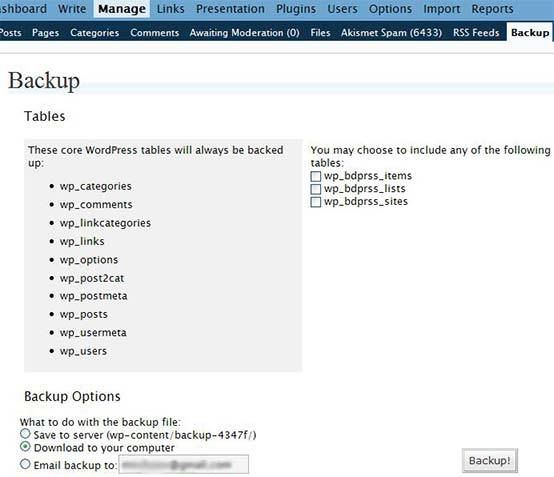
13. WordPress Database Backup - On demand backup of your WordPress database. You can either run backups manually or schedule them (daily, weekly, etc.)

(click to enlarge and open it in a new window)

14. WordPress Reports - gets stats from Google Analytics and Feedburner and adds them to the new ‘Reports’ tab

(click to enlarge and open it in a new window)

15. Custom Query String (CQS) - allows you to choose how many posts to be shown and specify how they should be ordered, for any of the ’search queries’ and blog categories.(’Options->CQS’)

16. Feedburner Feed Replacement - automatically detects all ways to access your blog feed (i.e. http://www.yourdomain.com/feed/ or http://www.yourdomai.com/wp-rss2.php, etc.), and redirects them to your FeedBurner feed so you can track every subscriber

17. Digg This - this one is a popular one, it detects incoming links from Digg.com to your wordpress post and automatically displays animated digg-count button(or text link) showing number of diggs a story got. Cool thing about it, is that as soon as your post is submitted to Digg, an email is sent to the site’s admin.

18. WP-Postviews - allows you to display the number of times a post has been viewed. In addition, you can use it to display your top 10 most popular posts.

19. HowTo: Separate Comments from Trackbacks - this isn’t a plugin but a quick and easy howto explaining how to separate blog comments from Pings/Trackbacks.

20. 1024px-10 - many people expressed interest to the theme used on makeuseof.com, hence I decided to post it here as well. It’s a simple theme which is extremely flexible for further buildup. Note that what you see on makeuseof right now is a slightly modified version. I shifted the sidebar menu to the left, this can be done by modifying style.css file in 2 places.

  • for the ‘content’ titled box change the float value from right to left
  • do the opposite for the ’sidebar’ one